
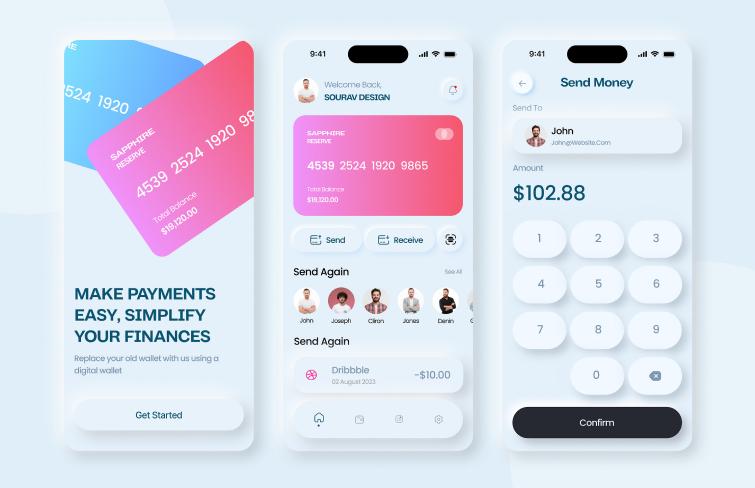
For years, flat design reigned supreme. From Apple’s iOS redesign in the early 2010s to Google’s Material Design, flat visuals dominated screens everywhere. Designers loved its clarity, developers loved its simplicity, and users accepted its clarity. Flat design emphasised two-dimensional graphics, minimal texture, and clean lines, all of which improved load times and kept interfaces distraction-free. It became the default aesthetic as screens got smaller and interfaces more complex.
But the digital world is in motion, and the next phase of user experience is emerging. Instead of rejecting realism outright, designers now blend simplicity with dimensionality. They inject surfaces with light, shadows, depth, and tangible interaction cues. This is not nostalgia for the skeuomorphic past — it’s a renewed focus on affordance, emotion, and delight. Welcome to the age of skeuomorphic realism in 3D web apps. In this new context, realism serves a purpose, not decoration.
At the forefront of this shift stands Spline, a browser-based 3D design platform that makes it easier than ever to integrate realistic, interactive 3D elements into real products and web interfaces. In particular, realistic 3D product toggles, once the domain of native software and games, now appear in web apps, adding tactile presence while remaining performant and scalable.
Why Web Design Is Embracing Realism Again?
Flat design won by stripping away unnecessary detail. It prioritised bold typography, generous spacing, and simple icons. This contributed to accessibility and responsiveness across devices. But that simplicity came at a cost: it stripped interfaces of physical cues that help users understand interactivity. Buttons and controls began to look alike, and designers compensated by relying heavily on colour and spacing to convey hierarchy and function.
Real-world surfaces behave under light. They reflect, refract, and respond to touch. When a toggle has perceived depth, or a product button appears to compress under a cursor, the interface feels more intuitive. Users instantly understand a control’s state — ON or OFF — not because of labels alone but because the physical metaphor imparts meaning. This form of realism leverages knowledge users already possesses about how objects behave in the real world, lowering cognitive effort and increasing satisfaction.
This new realism differs from early skeuomorphism. It avoids gaudy textures and heavy ornamentation. Instead, it uses subtle shadows, accurate materials, and motion to suggest physical presence. You don’t just see a button — you feel how it behaves. This approach underscores functionality while preserving readability and speed.
Spline: A New Tool for 3D Web Interaction
We’re moving away from flat design, and Spline is leading the way!
Spline is more than a 3D modelling app. It’s a real-time interactive design platform built for the web. Designers and teams work directly in the browser to shape 3D scenes, define interactions, animate motion, and export directly to production.
This tool equips creators with the same kinds of capabilities that once required game engines or custom WebGL coding. You can design 3D geometry, layer materials, animate objects, and attach behaviours that react to cursor or touch events. Most importantly, Spline outputs web-optimised scenes that integrate into existing frameworks such as React, Webflow, or plain JavaScript. This means designers can deliver 3D UI elements that feel alive without requiring a full rebuild of the app.
Spline’s power lies in its balance of depth and accessibility. It has enough depth for professional designers, including polygon editing, interactive states, and material layers, without intimidating newcomers or slowing down the design process. The result is a tool that democratises 3D for web teams.
Realistic 3D Toggles
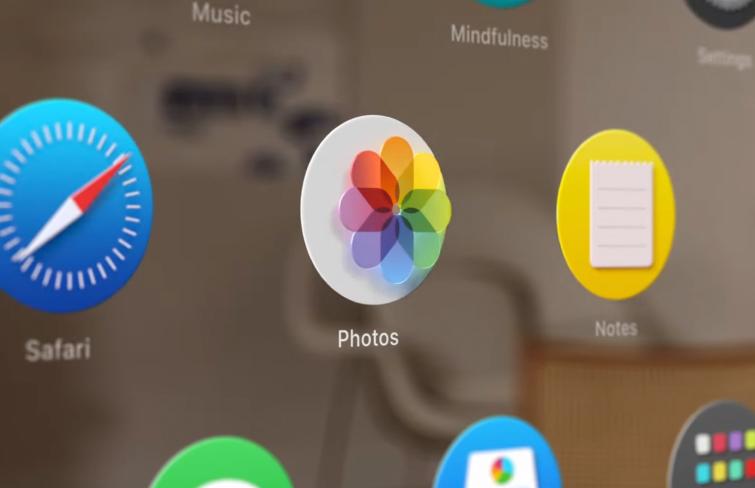
Why focus on toggles?
Because toggles represent tiny moments of interaction that become familiar through repetition. They are simple enough to implement without overwhelming a page, yet meaningful enough to materially improve user experience.
A toggle acts like a switch, slider, or dial — a control that visibly moves when clicked or tapped. In 2D interfaces, designers often rely solely on colour changes to indicate state, such as switching from gray to green to show “On”. While functional, this approach lacks depth cues that would help users feel the control.
Realistic 3D toggles create a convincing sense of physical interaction. Users can see the button slide with inertia, catch light on its surface, and settle into place with a satisfying finality.
To build these in Spline, you treat a toggle not as a flat SVG but as a physical object with thickness, materials, and motion. You model a simple geometry for the toggle, define materials that reflect light convincingly, and set up interactive events that respond to user actions. As the toggle moves between states, it might compress slightly, produce a subtle shadow shift, or emit a micro-animation that signals completion. These details make digital controls feel real.
Designing a Realistic 3D Toggle with Spline
Designing realistic 3D toggles in Spline starts with a clear idea of interaction. Choose a physical metaphor that makes sense for your product: a light switch, a mechanical slider, or a soft-edged button. Sketch the concept first, thinking through how it should move and what feedback it should convey.
Next, jump into Spline’s interface. Start by creating the basic geometry — a toggle body and the moving part. Bevel edges slightly so they catch light naturally. Avoid excessive complexity; too many polygons can slow down interaction without adding perceptible quality. Apply materials that mimic physical substances: a matte finish for a plastic body, soft highlights for a glossy switch, or brushed metal for premium products. Subtle variations in roughness and reflectivity give dimension without distracting.
Lighting matters. Position light sources to create soft shadows and gentle gradients across surfaces. Good lighting makes 3D shapes read clearly even on small screens. Then define the interactions. In Spline, you can assign states and events that respond to click or hover actions. Implement motion curves that feel natural, ease-in and ease-out transitions, so the toggle movement appears smooth and responsive. When the user toggles a switch, the animation should feel earned, not abrupt.
Finally, export your scene via the Spline Viewer and embed it into your web app. Spline’s web export enables browsers to load interactive 3D content while maintaining performance. You can even tie these interactions to your app’s state logic using variables or event handlers, making the 3D control truly functional.
Balancing Performance and Accessibility
Adding 3D doesn’t mean abandoning accessibility or performance. Keep your scenes lightweight. Limit polygon counts, reduce texture sizes when possible, and enable lazy loading so 3D elements load only when needed. If users prefer reduced motion (for accessibility reasons), provide fallback states that simplify or disable animations.
Remember: realism enhances experience but should never distract from usability. Use realistic toggles where they add clarity or delight — not where they compete with core content.
Looking Ahead: The Future of UI on the Web
The resurgence of realistic, interactive 3D elements in web design reflects broader changes in technology and user expectations. As browsers support richer graphics capabilities and devices become more powerful, users will expect interfaces that feel more engaging and alive. Three-dimensional visuals will not just ornament pages but serve as meaningful cues that help users understand what to do next.
Spline currently makes this future accessible by providing designers and developers with a shared language for embedding interactive 3D experiences into web apps. As tools evolve and performance improves, the line between native app fluidity and web interactivity will continue to blur. What once felt like a design luxury — realistic 3D controls — will become a distinguishing feature of premium user experiences.
Conclusion
We are witnessing a shift in the evolution of web design. Flat design served the industry well, but today’s users crave interfaces that feel real, not just look clean. Skeuomorphic realism, when applied thoughtfully, reconnects digital controls with our physical intuition. Tools like Spline make this possible without sacrificing performance or workflow efficiency. Realistic 3D product toggles are just the beginning. They show how digital experiences can feel more intuitive, satisfying, and human — even on the web.